
Are you ready to manage dozens, or perhaps hundreds, of remote employees?
The surge in collaborative software and mobile apps have removed the barriers that previously required workers to be on-premise for a typical nine-to-five workday. More employees are asking for flexible and remote work options, and more companies are offering it. Between 2005 to 2017, there was a 159% increase in remote work. Today 4.7 million, or 3.4% of the population is working remotely. These positions are not only increasing, they are proving to be profitable.
Why Manage Remote Employees?
A study by Regus looked at the link between flexible working practices and increased revenues and productivity, and found that 72% of global businesses report that increased productivity is a direct result of flexible work practices. Implementing flexible work options also widens the talent pool, allowing companies to hire the best employees despite their physical location. While there are several benefits that come along with a flexible work environment, managing a remote team is no easy task and requires a well-thought-out leadership in order to be successful.
Create Communications Guidelines for Remote Employees
Outline a communication strategy that makes it easy to remain in consistent contact with your remote employees. Depending on what type of work you are doing, this can range from a weekly call to daily check-ins. Be clear with your employees about your expectations of these check-ins so they can be prepared with their project status, goals met, customer issues, or whatever other items need to be discussed. If you are managing a widely dispersed team, you'll want to consider time zones and appropriate working hours when scheduling these meetings.
Provide Easy Communications Tools for Remote Work
For some organizations, simply using phone, email, and Slack or Skype should cover communications needs for remote workers. For others, particularly teams working on content or other creative endeavors, it's essential that you provide access to platforms that make remote communication — and collaboration — easy. For example, if you are creating videos, Wipster allows a remote team to simultaneously edit and comment in real-time. For design work, Mural offers an excellent digital whiteboard for designers and UX/UI teams. Regardless of your industry or role, there is a software solution out there that makes remote communication simple and effective.
Hold Remote Employees Accountable
Micromanaging your remote employees can cause stress and breakdown in team morale. On the other hand, holding employees accountable from a distance is essential in maintaining the remote-team machine, so focusing on deliverables is key.
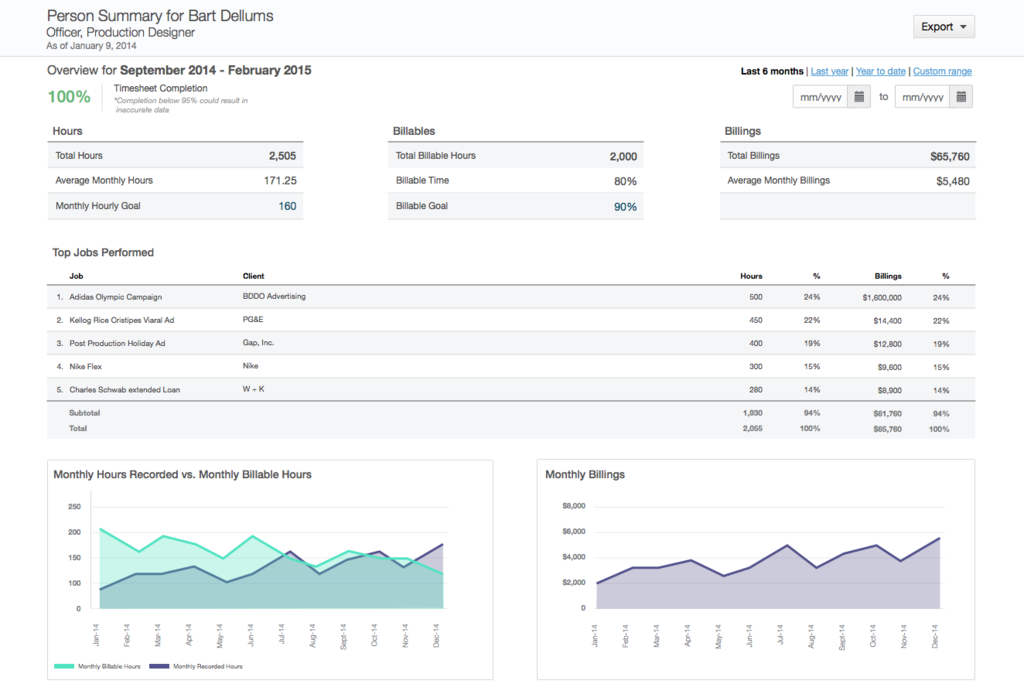
In your daily/weekly check-ins, provide timetables for projects and set standards of evaluation to ensure measurable results. Again, using the appropriate collaboration and management tools will ensure this process is smooth and information is accessible from anywhere. Tools that integrate well with others, and are mobile, are essential for remote teams. ClickTime is a great example of a tool that combines several tasks into one platform: timesheets, employee performance management, budget tracking, mobile time and expenses, project insights, and more. Depending on the needs of your team, choose tools that consolidate processes, encourage collaboration, and track processes using real-time data. If goals and expectations are clearly defined and the appropriate tools are used, your remote employees have no reason not to be successful.
Create a Culture That Embraces a Remote Workforce
Creating a sense of culture in the workplace is more of a challenge with a team that doesn't regularly meet face-to-face; that's just the way it goes. However, there are ways to provide incentives to remote employees that make them feel as though they are appreciated and a valued member of a team. Uncover is a service that provides a selection of monthly perks and rewards to employees who reach their monthly goals or go above and beyond in some way (of course, you can always send a perk just to be nice). Perks can include things like Spotify radio subscriptions, Uber vouchers, and Amazon gift cards. In addition to a rewards system, making time for face-to-face interaction is important to build relationships and camaraderie within the team, so it's helpful to plan a yearly retreat or get-together for employees to interact and discuss things other than work.
Cora Cloud is Sangoma's Content Marketing Specialist. She has over seven years of sales and marketing experience, working with businesses on their content and marketing strategies. She worked full time while attending the University of Alabama in Huntsville, and graduated with honors, earning her degrees in Marketing and Communication Arts. She enjoys writing about Unified Communications, Cloud computing, productivity, millennials, and other topics to help keep SMBs informed about business communications.